Ask residents for feedback on a building decision
Create a short opinion survey for a property or a specific building. Choose the eligible residents, how participation is counted and when results are visible.
Create a manager account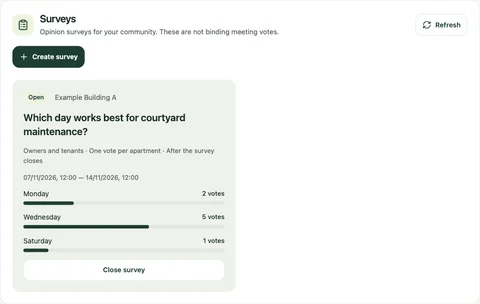
The manager panel shows the audience, available choices and response totals.
From the Yonelio app · Manager panel · Sample data.View full screenshot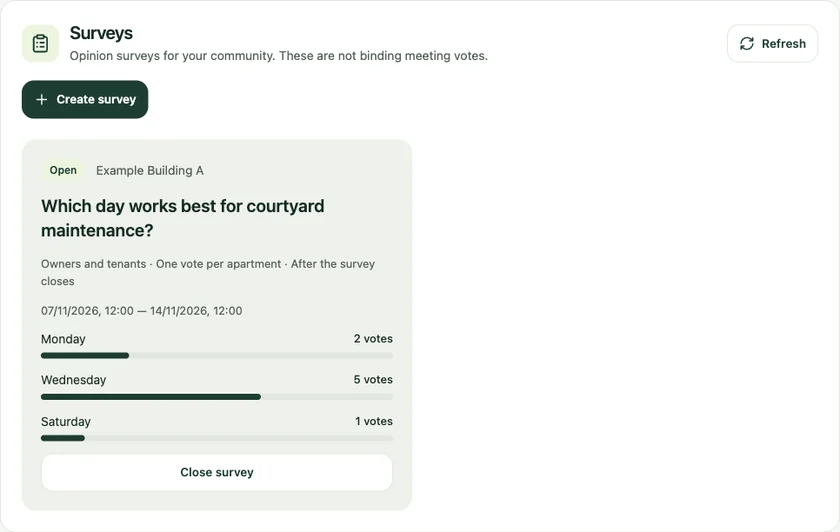
Who it’s for
For residential managers who want structured feedback from owners or tenants on shared spaces, schedules or other day-to-day matters.
How it works
Write the question and options
In the manager panel, open Surveys and enter a question with two to eight distinct answers.
Choose the audience and dates
Select the property or one building, include owners, tenants or both, and set the opening and closing times and participation rule.
Set result visibility and review
Choose when residents can see results, or keep them available to management. Review the settings before creating the survey.
Follow participation
Eligible residents answer in their account while the survey is open. Management can close it early and review the responses.
Finding a suitable time to clean the courtyard
Management offers Saturday morning and Sunday afternoon to the residents of one building. They allow one response per apartment and show residents the results after the survey closes.
Reach the people affected by the question
A courtyard question may concern the whole property. A change to bicycle storage may matter to one building. Define the audience when you create the survey, choose one response per person or apartment, and review the question and options before saving.
Common questions
Can two residents from one apartment answer?
With one response per apartment, the first eligible response uses that apartment’s place. The one-per-person rule counts eligible residents individually.
Can I edit the options after creating a survey?
Options stay fixed after creation. Review them before saving and create a new survey if the question needs different choices.
When can residents see results?
The manager sets visibility when creating the survey. Results can be shown immediately, shown after it closes or reserved for management.
Can an opinion survey record a binding decision?
Yonelio surveys gather feedback. Formal decisions follow the community’s own decision process.
Related features
Resident portal
Give residents a direct way to see the apartment information and financial records they are allowed to access.
Resident requests
Residents can describe an issue from their apartment account. The manager can find the request in the property inbox, respond and update its status as work moves forward.
Buildings & units
Give each apartment a clear record within its building, with the people and roles that belong to it.