Set up buildings and apartments from a spreadsheet
Bring a building roster into the manager panel using a UTF-8 CSV or single-sheet XLSX file. Review the rows before creating buildings, apartments and owner or tenant links.
Create a manager account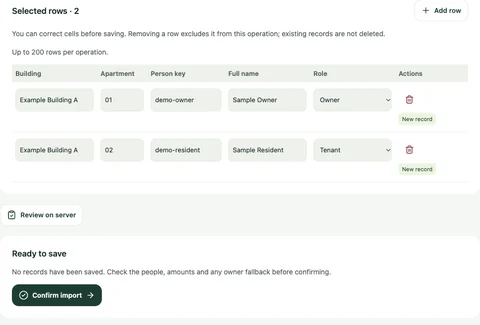
The preview marks the new rows so the manager can check them before saving.
From the Yonelio app · Manager panel · Sample data.View full screenshot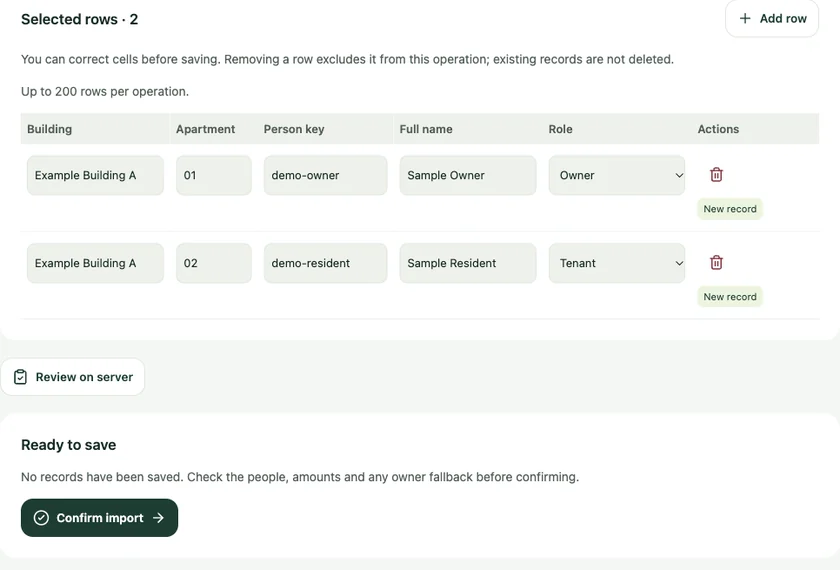
Who it’s for
For managers starting with an existing spreadsheet or adding another building to a property they already manage in Yonelio.
How it works
Download the template
Open Bulk actions and select Import records. Use the five-column template and prepare up to 200 rows in a file of up to 1 MB.
Check the rows in the panel
Upload the file. Correct individual cells or exclude rows that are not ready for this import.
Preview and confirm
Review which records will be created and which existing ones will be kept. Run the preview again after a correction, then confirm the reviewed rows.
Set up the next building without re-entering every unit
A manager has a spreadsheet with two buildings that both contain an apartment numbered 12. By filling in the building column for each row, they keep the apartments separate and use the preview to confirm the linked owners or tenants.
Turn a roster into connected apartment records
The template carries five columns for the building, apartment, person key, full name and role. A row can represent a building on its own or include an apartment and its linked person. If the same person appears on multiple rows, an explicit person key connects them within the property. Two matching names alone do not merge.
Common questions
Which spreadsheet formats can I upload?
Use a UTF-8 CSV or a one-sheet XLSX file. Formula cells and multi-sheet workbooks are outside the supported format.
Will the import overwrite an existing building or resident record?
Existing records are kept. The preview shows where a row matches an existing record and where a new one will be created.
Does importing a person give them resident access?
It creates the person and apartment link. The manager enables phone sign-in separately for the intended resident.
Can I import historical balances and payments here?
This import sets up buildings, apartments and linked people. Use the finance workflows to create charges and record payments.
Related features
Buildings & units
Give each apartment a clear record within its building, with the people and roles that belong to it.
Resident portal
Give residents a direct way to see the apartment information and financial records they are allowed to access.
Bulk and monthly charges
Set up a one-time charge for selected apartments or turn a reviewed draft into a monthly plan. The manager panel shows who will be charged and what will remain due after eligible advances.